

Plug the same mortgage into a Canadian calculator and an American one, and you’ll get two different numbers, even with identical inputs. Same home price, same down payment, same rate, same amortization, and yet the payment doesn’t match. People assume they typed something wrong. They didn’t. Canadian mortgages are legally required to compound semi-annually rather than monthly, and most calculators built for a US audience quietly assume the wrong math. It’s a small difference per payment, usually a few dollars, but it’s the reason a “free mortgage calculator” you found through a generic search can hand you a figure that’s subtly off from what your actual lender will quote.
- The Math a Calculator Is Actually Running
- What Different Down Payments Actually Do to Your Payment
- Payment Frequency Changes More Than Your Budgeting Rhythm
- A Payment Calculator Isn’t the Same Thing as an Approval Calculator
- What the Payment Number Leaves Out Entirely
- Where the Wrong Assumptions Creep In
- Using the Calculator to Actually Plan a Payoff
- Now What
- Frequently Asked Questions
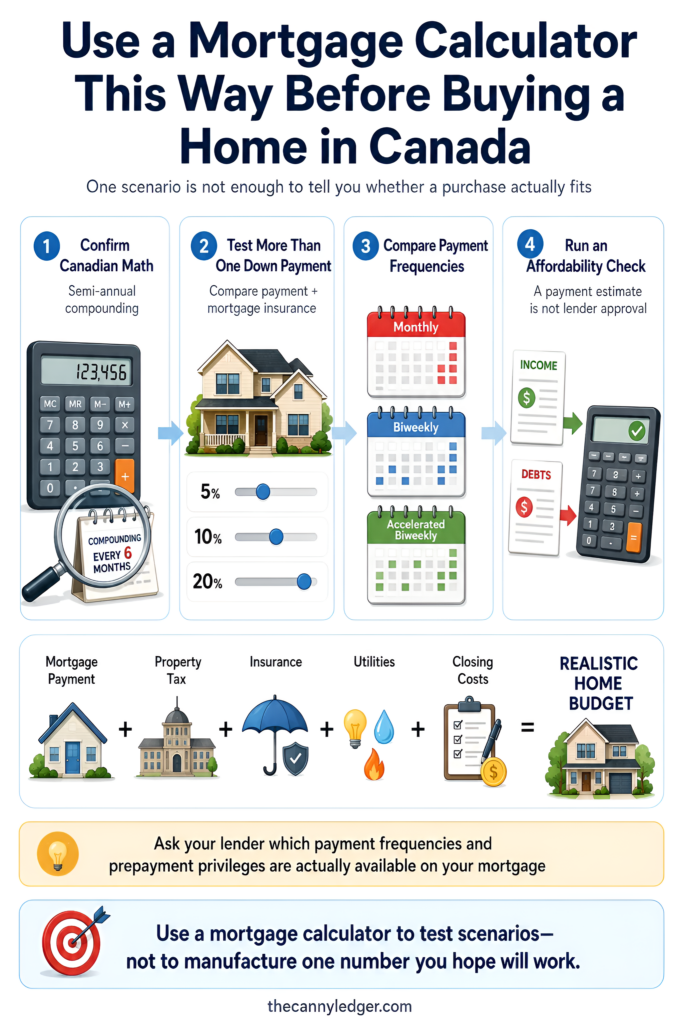
A mortgage calculator, done properly for a Canadian borrower, takes four numbers. The purchase price, your down payment, the interest rate, and the amortization period, then converts that annual rate into an effective monthly rate using semi-annual compounding before it spits out a payment. Add mortgage default insurance to the mix if your down payment is under 20%, and there’s a fifth number folded into the loan balance before the payment math even starts. As of August 2026, the best insured five-year fixed rates sit in the 3.94% to 4.04% range, and running that rate through the correct Canadian formula on a typical purchase produces a monthly payment in the low $2,000s for every $100,000 or so of mortgage, depending on your exact rate and amortization.
The Math a Calculator Is Actually Running
The formula itself isn’t secret, and walking through it once means you’ll never look at a payment number as a black box again. Canadian lenders are required to compound mortgage interest no more than semi-annually, twice a year, even though you’re making payments monthly. That means the annual rate you’re quoted, say 4.04%, isn’t simply divided by 12 to get your monthly rate. Instead, it gets converted using the formula (1 + annual rate ÷ 2) raised to the power of one-sixth, minus 1. At 4.04%, that works out to an effective monthly rate of roughly 0.334%, compared to the 0.337% you’d get from a flat division by 12. The gap looks tiny, but it compounds across 300 monthly payments on a 25-year mortgage, and it’s the entire reason a US-style calculator overstates a Canadian payment.
Once you have that effective monthly rate, the standard payment formula takes over, principal times the rate divided by one minus the rate plus one raised to the negative power of the total number of payments. Nobody needs to memorize that. What matters is knowing it exists, because it’s what separates a calculator that’s actually built for Canada from one that’s been lightly rebranded from an American template. If you want to see it applied correctly without doing the math yourself, the federal government runs its own mortgage calculator through the Financial Consumer Agency of Canada, and CMHC offers a comparable tool that folds in default insurance automatically.

What Different Down Payments Actually Do to Your Payment
Numbers land better with a real scenario attached, so take a $500,000 home and run it three ways. A buyer putting 20% down borrows $400,000 outright, no default insurance required, and at 4.04% on a 25-year amortization that comes out to roughly $2,113 a month.
Drop to 10% down and the picture shifts more than most people expect. You’re now borrowing $450,000, but because your down payment sits between 85.01% and 90% loan-to-value, CMHC’s premium schedule adds a 3.10% insurance premium on top, roughly $13,950, which gets rolled into the loan rather than paid upfront. Your effective mortgage balance climbs to about $463,950, and your monthly payment lands around $2,451, a jump of nearly $340 a month compared to the 20%-down scenario, even though the home price didn’t change at all.
Push down to a 5% minimum down payment and the premium jumps again, this time to 4.00% at that loan-to-value tier, adding roughly $19,000 to a $475,000 base loan. The resulting payment comes in around $2,609 a month, nearly $500 higher than the 20%-down version on the exact same house. That’s the part a lot of first-time buyers miss when they’re only looking at the sticker price of the home rather than the size of their down payment relative to it.

Payment Frequency Changes More Than Your Budgeting Rhythm
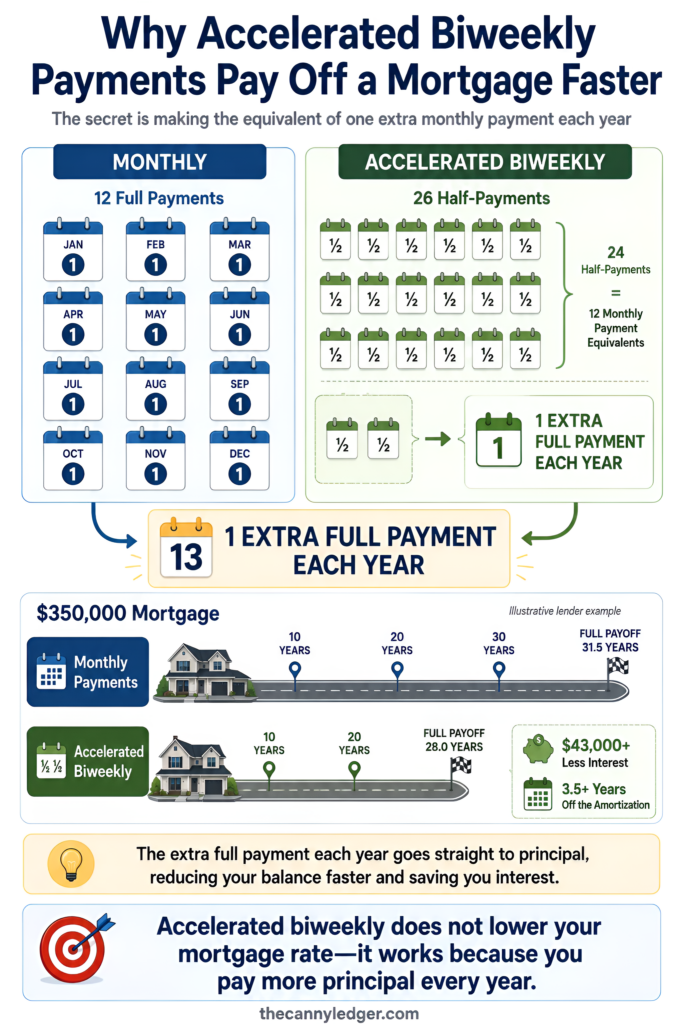
Most calculators default to monthly, but switching how often you pay is one of the few levers a borrower controls entirely on their own, no renegotiation, no lender approval, often no cost at all. Weekly, biweekly, and semi-monthly options all exist, and the one worth understanding closely is accelerated biweekly.
With a regular biweekly schedule, you pay half your monthly amount every two weeks, which works out to the same total as monthly payments spread differently. Accelerated biweekly is different. You still pay half your monthly amount every two weeks, but because there are 26 two-week periods in a year rather than 24, you end up making the equivalent of one extra full monthly payment annually without ever feeling like you increased your budget. RBC’s own example illustrates the scale of that effect clearly, on a $350,000 mortgage, switching from monthly to accelerated biweekly payments saves more than $43,000 in interest and cuts more than three and a half years off the total amortization. That single setting, buried in a dropdown menu on most calculators, does more to shorten your mortgage than almost any other decision you’ll make after signing.
A Payment Calculator Isn’t the Same Thing as an Approval Calculator
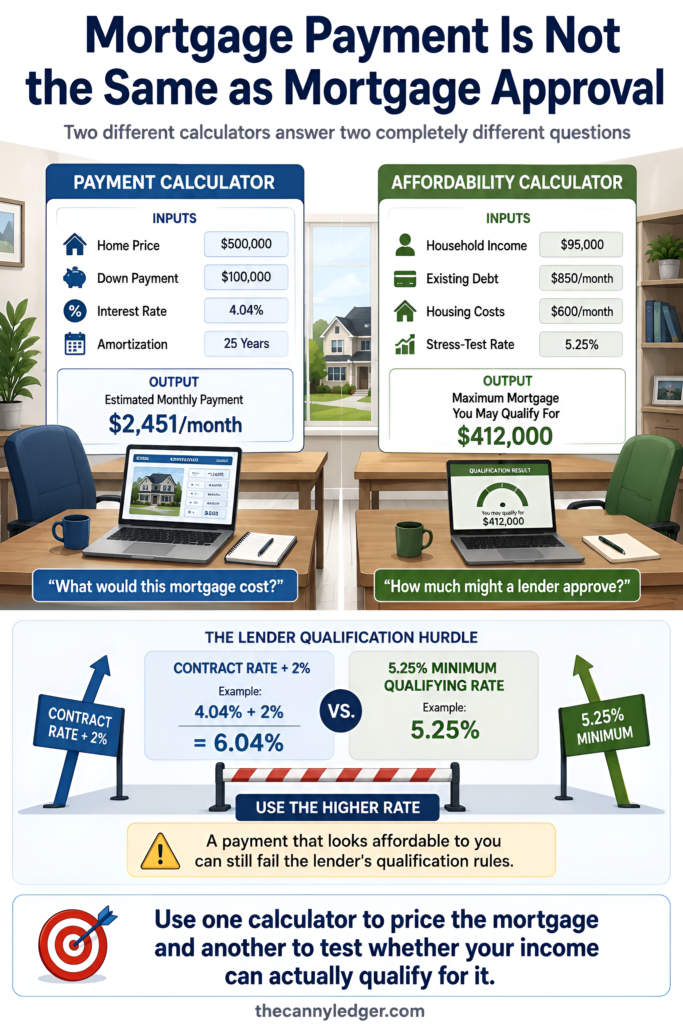
This trips people up constantly, and it’s worth being direct about it. A standard mortgage payment calculator answers one question only, what will my monthly payment be at this price, rate, and amortization. It has nothing to say about whether a lender will actually approve you for that amount.
Approval runs through a separate process built around your income, your existing debt, and the federal stress test, which requires you to qualify at the higher of your contract rate plus 2% or a minimum rate currently set at 5.25%. A payment calculator showing you a comfortable $2,451 a month tells you nothing about whether your income and other obligations clear the stress-tested bar a lender will actually apply. If you want that second number, an affordability calculator built around your income and debt load is the tool that answers it, not the payment calculator you used to price out the home itself.
What the Payment Number Leaves Out Entirely
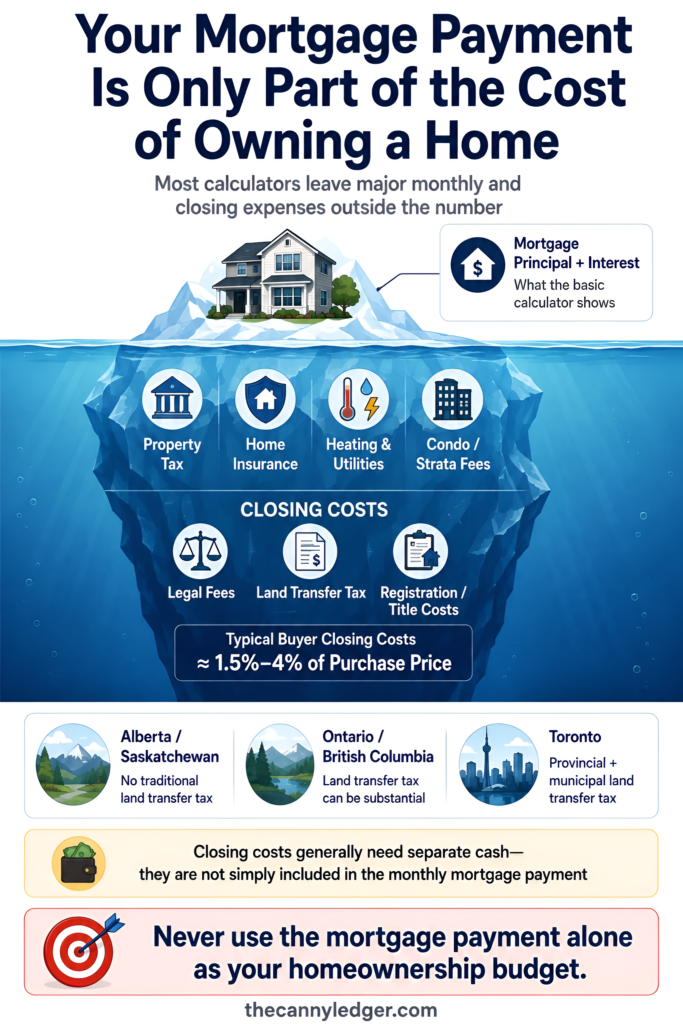
Every mortgage calculator, Canadian or otherwise, is estimating principal and interest only. That’s a meaningful chunk of your housing cost, but it’s rarely the whole picture, and treating it as your full monthly obligation is one of the more common budgeting mistakes buyers make.
Property tax gets added on top, and it varies by municipality rather than following any national formula, so your calculator’s output needs a separate line item pulled from your specific city’s rates before you know your real monthly number. Condo or strata fees, where applicable, add another variable cost the calculator never sees. Home heating and insurance are additional monthly obligations that a bare payment calculator has no way to estimate for you.
Then there’s the one-time hit that catches people off guard on closing day rather than every month after. Closing costs in Canada typically run 1.5% to 4% of the purchase price for buyers, and the single biggest driver of where you land in that range is land transfer tax, which varies enormously by province. Alberta and Saskatchewan charge only nominal title registration fees with no land transfer tax at all, while Ontario and British Columbia charge a real percentage of the purchase price, and Toronto buyers pay both a provincial and a municipal land transfer tax on the same transaction. None of that shows up in a monthly payment calculator, and none of it can be paid out of your mortgage, so it needs its own line in your budget well before closing day.
Where the Wrong Assumptions Creep In
A few mistakes show up again and again when people run their own numbers, and most of them trace back to trusting a calculator’s default settings without checking what they actually assume.
Assuming amortization and term are the same thing is probably the most common one. Amortization is the total number of years it will take to pay off the mortgage if nothing changes, usually 25 or 30 years. Term is the length of the specific rate agreement you’ve signed, typically five years, after which you renew at whatever rate is available at the time. A calculator set to a 25-year amortization is not telling you your rate is locked for 25 years, only that the payment schedule assumes that horizon if conditions never change.
Forgetting that a CMHC premium changes the loan balance, not just the down payment percentage, is another. People often calculate their payment off the loan amount before insurance, then wonder why their actual quote from a lender came in higher than expected. Ignoring renewal risk entirely is a third. A calculator run today, at today’s rate, tells you nothing about what your payment will look like in five years if rates have moved, and treating today’s number as a permanent fixture rather than a five-year snapshot sets buyers up for an unpleasant surprise at renewal.

Using the Calculator to Actually Plan a Payoff
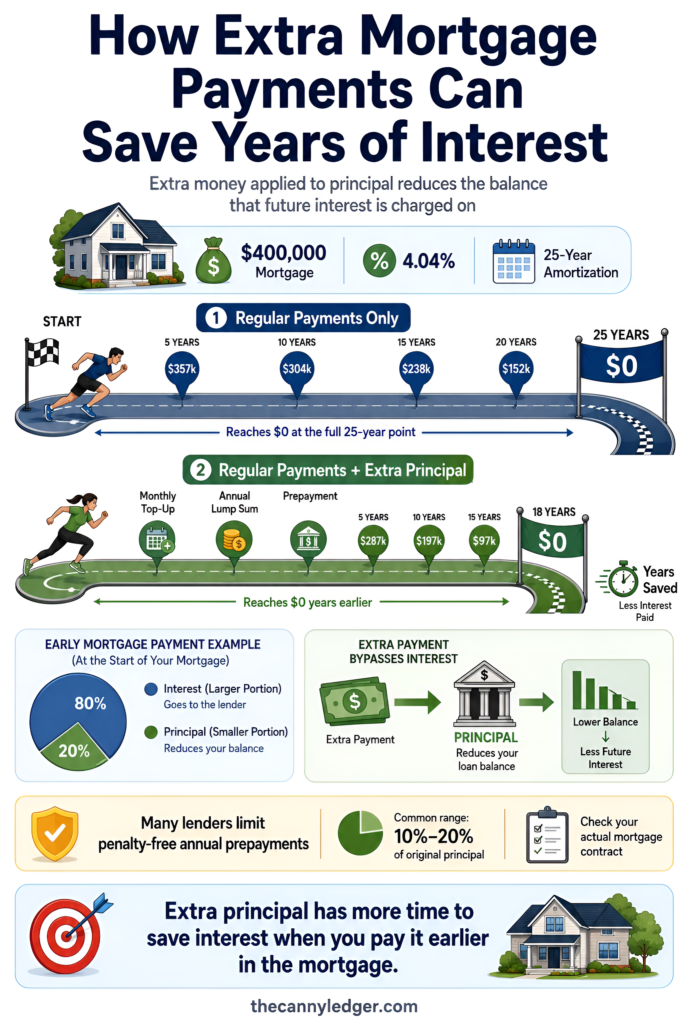
Beyond pricing out a purchase, the same math powers a real planning exercise, modelling what extra payments do to your timeline. Most full-featured calculators let you add a lump sum, a recurring extra monthly amount, or an annual prepayment on top of your regular schedule, and the effect compounds faster than most borrowers expect because early mortgage payments are weighted heavily toward interest rather than principal.
Take that same $400,000 mortgage at 4.04% on a 25-year amortization. Adding even a modest extra amount to each monthly payment, applied directly to principal, shortens the amortization and reduces total interest paid, because every dollar that goes toward principal early stops accruing interest for the rest of the loan’s life. Most lenders cap how much you can prepay each year without triggering a penalty, commonly somewhere between 10% and 20% of the original principal, so it’s worth checking your specific mortgage’s prepayment privileges before assuming you can pour an unlimited amount toward the balance. Run a few different extra-payment amounts through a calculator before you commit to one, since the difference between a modest monthly top-up and an annual lump sum can produce meaningfully different payoff timelines depending on your cash flow.
Now What
Pricing a mortgage with a calculator is only useful if the number you get out of it actually reflects your situation. Start by confirming the calculator you’re using applies Canadian semi-annual compounding rather than a generic monthly formula, since that single setting changes every number that follows. Run your purchase price through at least two down payment scenarios, not just the one you’re currently planning for, so you can see in real dollars what an extra 5% or 10% down actually buys you in payment relief. If you’re weighing payment frequency, ask your lender directly whether accelerated biweekly is available at no cost, since not every lender offers it by default. And once you’ve settled on a rough number, run it against an affordability calculator built around your actual income and debts, because a payment you can technically make on paper and a payment a lender will actually approve you for are two different questions.
Frequently Asked Questions
Why does a Canadian mortgage calculator give a different number than a US one for the same inputs? Canadian mortgages compound interest semi-annually by law, while US mortgages typically compound monthly. That difference changes the effective monthly rate used in the payment formula, so identical inputs produce a slightly lower payment under Canadian rules than under American ones.
Does a mortgage payment calculator tell me how much I’ll actually be approved for? No. A payment calculator estimates what a given price, rate, and amortization would cost you monthly. Approval depends on your income, debt load, and the federal stress test, which is a separate calculation an affordability calculator is built to handle.
Is accelerated biweekly actually free, or does it cost extra to set up? Most Canadian lenders offer accelerated biweekly and other payment frequency options at no additional cost, since you’re simply restructuring the same annual payment total into smaller, more frequent installments plus one extra payment equivalent per year. Confirm directly with your specific lender, since practices can vary.
Do calculators include property tax and closing costs automatically? Rarely, and it’s worth checking which fields a specific calculator actually fills before trusting its total. Most tools estimate principal and interest only, meaning property tax, condo fees, heating costs, and one-time closing costs like land transfer tax need to be added on separately for an accurate monthly and upfront budget.
For related tools and background, our mortgage affordability calculator and mortgage amortization calculator build directly on the math covered here. Our guides to current mortgage rates in Canada, fixed mortgage rates in Canada, and mortgage rates by province are useful next stops for the rate side of the equation, and our breakdown of mortgage insurance in Canada covers the CMHC premium side in more depth than fits here. If you’re weighing how much cash cushion to keep beyond your down payment, our piece on emergency savings for Canadian homeowners is worth a read before you finalize a number.