

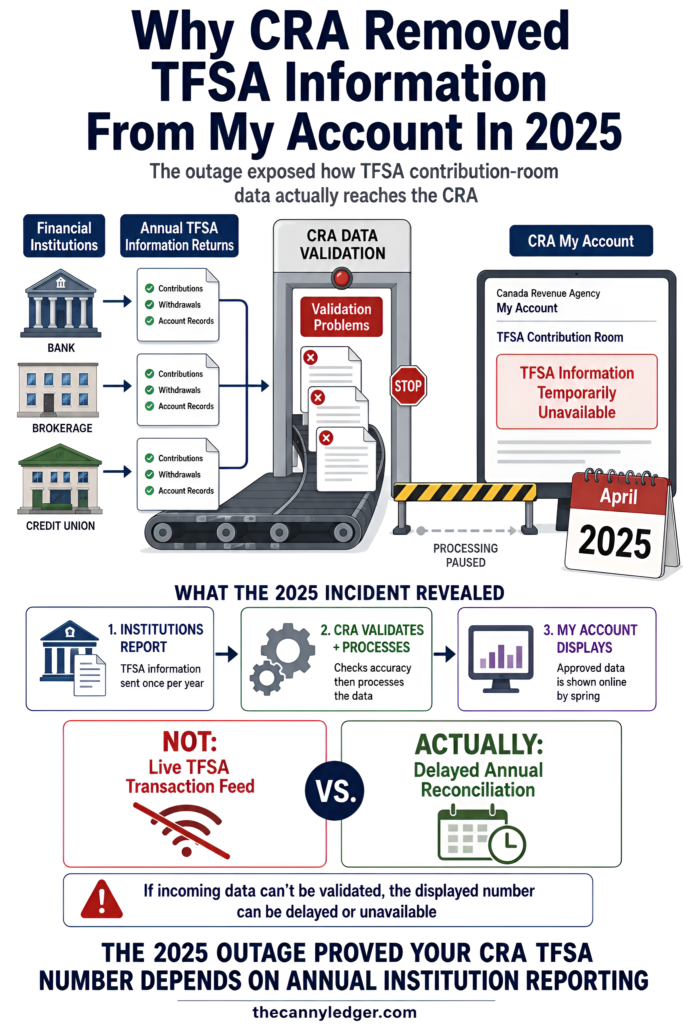
In April 2025, the CRA quietly blocked TFSA information from every taxpayer’s online account entirely, taxpayers and their accountants alike. The agency’s own explanation was that financial institutions had submitted TFSA reporting data that failed new validation checks, and rather than display numbers it couldn’t stand behind, the CRA pulled the dashboard down until it could sort out the mess. If you’ve ever assumed the number in your CRA account is a live, always-accurate reflection of your TFSA, that real incident is worth knowing about, since the system behind that number is a lot more fragile than it looks.
Your TFSA contribution room isn’t tracked in real time. It’s built from annual information returns your financial institution submits to the CRA, due by the end of February each year, meaning the room displayed in your CRA My Account for any given year typically isn’t fully accurate until that following spring. The core mechanics of how a TFSA works overall and the calculation itself, with how much room you likely have based on your own history, are both covered in full detail elsewhere on this site. This piece is specifically about the mechanics behind the number you’re actually looking at.
Why the CRA Portal Isn’t a Live Tracker
Every TFSA issuer, your bank, your brokerage, your credit union, is required to report your prior year’s contributions, withdrawals, and account activity to the CRA, but that reporting deadline sits at the end of February of the following year, not immediately after each transaction. According to the CRA’s own guidance on calculating your contribution room, records from a given year are typically fully processed into My Account by April of the following year, and the agency’s own page states plainly that this is the point at which checking your room is actually reliable.
That means a contribution you made in June could sit unreflected in your CRA account for the better part of a year. The portal updates once, automatically, on January 1 with the new annual dollar limit, then updates again, more slowly and less predictably, as institution reports get processed through the following winter and spring.

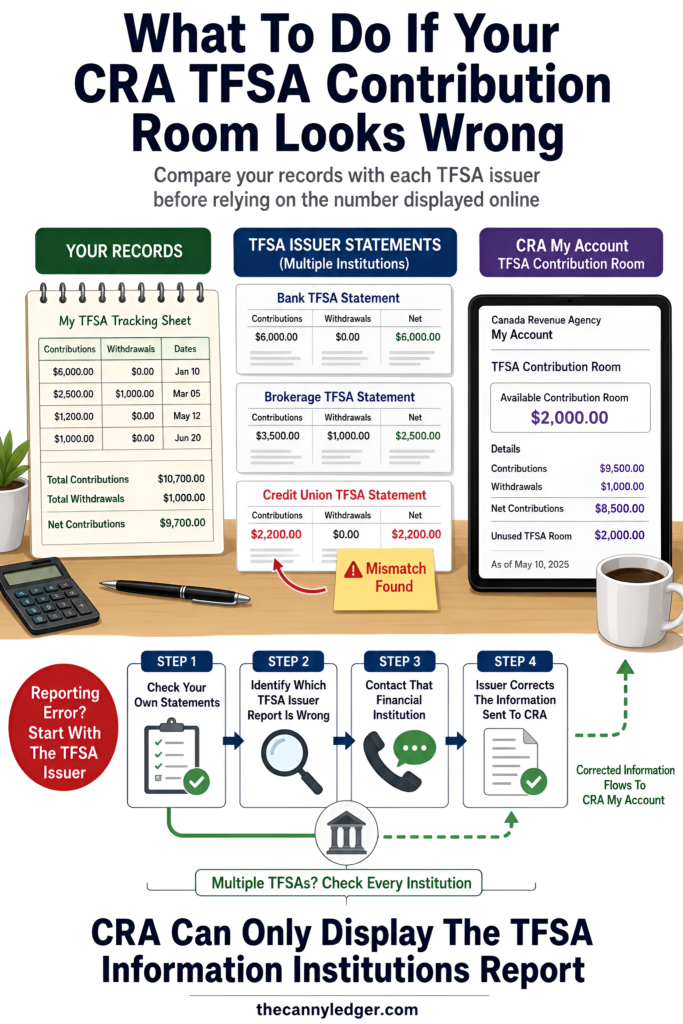
What Happens When Your Own Records and the CRA’s Don’t Match
A mismatch between your own statements and what’s displayed in your CRA account gets fixed through your financial institution, not the CRA directly. The CRA’s own guidance is explicit on this point, if you disagree with any contribution or withdrawal information on file, the correct step is contacting the TFSA issuer that submitted it, since the CRA’s system is only as accurate as what each institution actually reported. Anyone holding TFSAs across more than one institution should cross-check every issuer’s own statement against what CRA displays, since a discrepancy at any single institution can throw off your true total without the portal ever flagging it as wrong.
What the 2025 Outage Actually Showed
The blocked dashboard from spring 2025 wasn’t a one-off glitch unrelated to the normal system. According to reporting from the Globe and Mail, the CRA attributed the outage specifically to delays processing the same annual institution reports this piece has been describing, confirming that the entire structure runs on a once-a-year batch process rather than anything closer to continuous updates. That’s the honest state of the system behind the number, not a live balance the way a bank app shows one, but an annual reconciliation with a real lag built into it by design.
Checking Your Number With This in Mind
Treat any number in your CRA account from January through early spring as provisional rather than final, and lean on your own institution’s statements for anything you contributed in the past several months specifically. If a discrepancy turns up, go straight to the issuer that reported it rather than escalating with the CRA first, since that’s actually where the correction has to originate. And if you’re planning a large contribution and want real certainty rather than an estimate, wait until after the CRA’s own spring processing window closes before treating its displayed figure as something you can act on without double-checking it yourself, since getting this wrong is exactly how an overcontribution penalty happens in the first place.